
Gantt chart and capacity optimisation
See Your Capacity and Quote the Right Due Date Instantly.
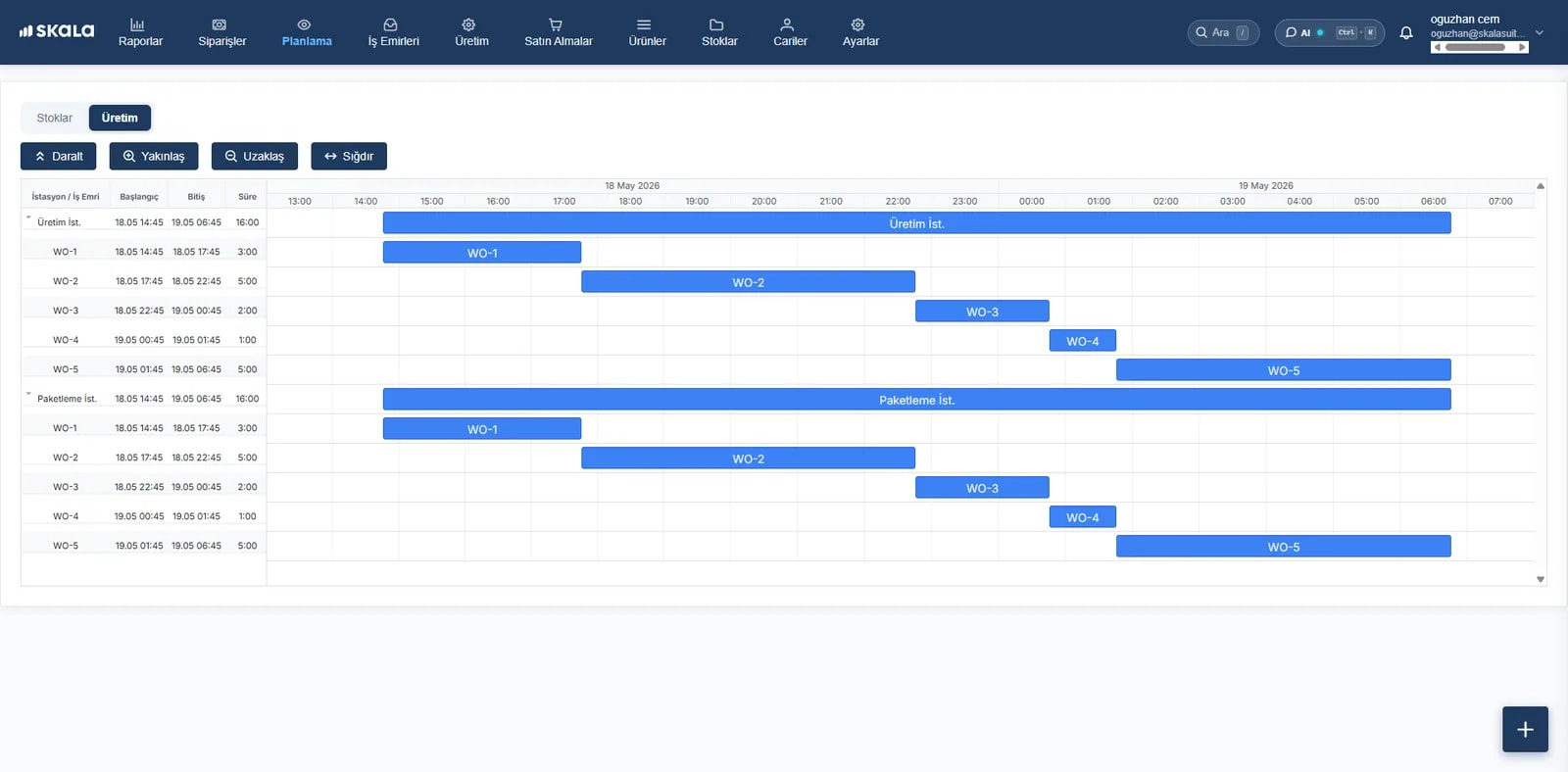
Assign work orders to your machines and equipment dynamically with a drag-and-drop Gantt chart. See which line is full, which machine has a gap and which order is at risk of delay, all on one live calendar.
- Less delivery deviation
- Up to 35%
- Urgent order scenarios
- Rush
- Time analysis
- Actual vs. planned
What's on the planning screen?
Visual Scheduling with a Gantt Chart
See work orders on a timeline; move jobs between machines with drag and drop and resolve clashing deliveries instantly.
Gantt Chart FeatureLive Capacity and Bottleneck Analysis
See the load (%) of every machine and work station. Catch overloaded lines and bottlenecks before production grinds to a halt.
Capacity PlanningStandard Operation and Set-Up Times
Calculate the planned finish date automatically from the standard operation and set-up times in the BOM, eliminating human error.
Time Calculation EngineDynamic Rush Orders and Re-Planning
Simulate instantly how an urgent B2B order would affect the current schedule and other customers' delivery dates.
Rush Order ManagementMaterial Availability and Stock Check
Don't release work orders with missing raw materials to the floor. Check material stock live while you plan.
MRP & Stock CheckPlanned vs. Actual Time Analysis
Compare planned and actual times with live data from the floor; sharpen your future delivery estimates.
Efficiency Reports
Real-time data synchronisation
Live Data from the Floor Updates the Plan, Not Someone at a Desk
In many factories, planning sheets are just weekly guesses that fall apart in the first hour of the day. In Skala, the Gantt chart updates itself the moment an operator finishes a step on a phone or tablet. Your planning board is not last week's guess; it is the reality on the floor right now.
- Instant Automatic Plan Updates from Operator Records
- Automatic Alerts for Orders at Risk of Delay
- Support for Shift, Break and Machine Maintenance Calendars
- One-Click Dynamic Re-Planning for Disrupted Lines
Handle Complex Scheduling in Seconds with Drag-and-Drop Simplicity
A smart planning canvas that is fully visual and drag-and-drop, with no technical training required.
- Step 1
Drag Open Work Orders onto the Schedule
Pick up work orders waiting in the list that are not yet planned and drop them onto the relevant machine's timeline. The system calculates the finish date from capacity instantly.
- Step 2
Change Duration and Sequence Flexibly
Drag the ends of a bar to lengthen or shorten an operation; drag it from the middle to change the start time and machine sequence.
- Step 3
See Clashes and Bottlenecks Instantly
Jobs that overlap on the same machine or loads that exceed capacity are flagged automatically with coloured warnings.
- Step 4
Resolve Material Shortages in Advance
A “Missing Material” icon appears on work orders whose BOM raw materials are not ready in the warehouse. Jobs can't be released to a machine until the missing material arrives.
Questions about production planning
What does production planning software do?
Production planning software weighs orders, capacity and material availability together so you can decide which job runs on which machine and when. With the right plan you hit due dates and reduce idle capacity and overtime.
What makes the plan different from Excel?
An Excel plan is made once and goes stale with the first change on the floor. In Skala the plan is linked to operator records, stock and orders, and updates itself with every change.
Can I define capacity per machine?
Yes. You can define working hours, shifts and capacity for every work station and machine.
Skala's other modules
- Production managementWork order, BOM and cost tracking
- Inventory managementReal-time, multi-location stock
- Order managementOne flow from order to shipment
- Warehouse managementBarcode receiving and shipping
- AI-powered forecastingPurchasing and stock suggestions
- Accounting integrationsParaşüt, Logo İşbaşı, Mikro…
Build your planon real data.
Orders, production, inventory and warehouse in one place. Your onboarding specialist is with you from day one.
- Live in under a week
- We import your Excel data
- Real humans on support